
Local SEO for Small Businesses UK: How to Rank on Google Maps in 2026


Local SEO for Small Businesses UK: How to Rank on Google Maps in 2026
Table of Contents
Serious about growing your business? Let’s plan exactly how to get you more leads, sales, and results—faster.
Want more local customers to find your business on Google? Local SEO helps you appear in Google Maps, the Local Pack, and local search results when people are looking for your services.
Google primarily considers relevance, distance, and prominence when ranking local businesses. That means your Google Business Profile, website, reviews, local citations, and backlinks all matter.
At Credofy, we help businesses turn local search visibility into qualified enquiries.
Below, we’ve compiled a step-by-step guide based on the strategies we use to help our clients rank higher on Google Maps and how you can apply them to your business to win more clients in 2026.
How Google Maps Rankings Work
Before you start optimising your business, it helps to understand what Google looks at when deciding which businesses appear in local results.
According to Google Business Profile Help, local rankings are mainly based on relevance, distance, and prominence.
Relevance
Relevance is about how closely your business matches what someone is searching for.
Google looks at information such as your business category, services, business details, and website content to understand what you offer and which searches you’re relevant for.
For example, if someone searches for commercial estate agent Manchester, your category, services and website content should clearly reflect that service and location.
Distance
Distance refers to how close your business is to the person searching. If two businesses are similarly relevant, the one closer to the searcher may have an advantage.
You can’t control where a customer searches from, but you can make sure Google has accurate information about your business location and service areas.
Prominence
Prominence refers to how well-known and established your business is. Google considers signals such as reviews, ratings, and links from other websites when assessing this.
That’s why building genuine reviews and earning relevant local backlinks can strengthen your local search presence over time.
Understanding these three factors is useful, but knowing them isn’t enough. Here’s how to actually improve the signals Google uses to understand and rank your business.
Marketing Research & Strategy
We help you understand your market and build smart strategies to attract more customers and grow faster.
- Detailed research into your competitors, customers, and market
- Custom marketing and growth plans that drive real results
- Clear action steps to increase traffic, leads, and sales

ADWORDS ROI

Cut Ad spend

Step-by-Step Process to Rank on Google Maps in 2026
Now that you understand what influences local rankings, it’s time to put those signals into practice. Start with the foundation: your Google Business Profile.
Step 1: Claim and Verify Your Google Business Profile
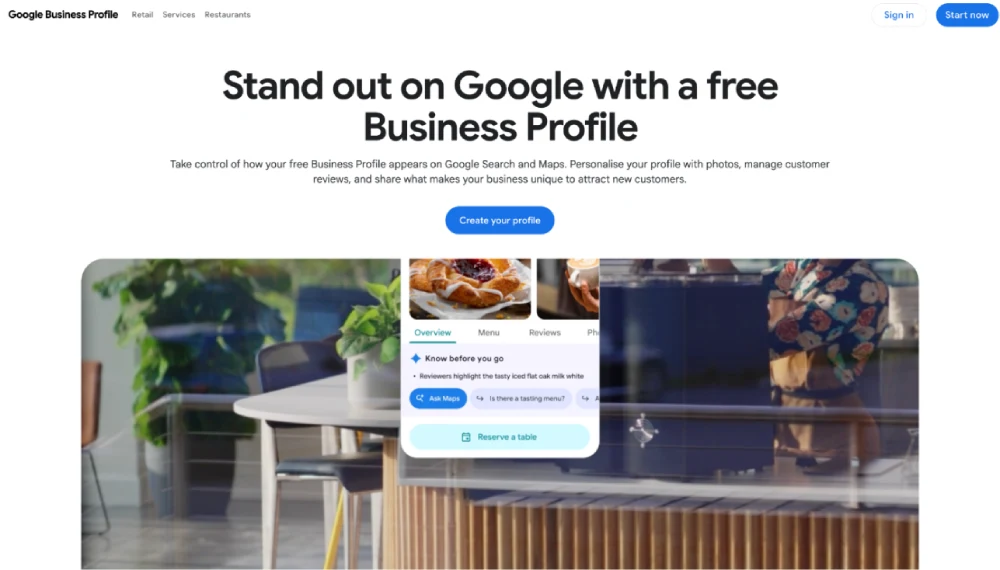
Your Google Business Profile is one of the first things to get right. If you haven’t claimed your profile yet, claim it through Google Business Profile and complete Google’s verification process.
Source: Google Business Profile
Once verified, make sure your profile accurately reflects your business, including:
- Business name
- Address
- Phone number
- Website
- Opening hours
- Service area
- Business type
Google recommends providing complete and accurate business information so customers can find and understand your business more easily.
Use Your Real Business Information
Keep your business name exactly as it is used in the real world. Don’t add extra keywords, locations or services simply to try to rank higher.
The same applies to your address. Don’t use a virtual office, fake location or another address where your business doesn’t actually operate just to appear closer to potential customers.
Accurate information gives Google and your customers a clearer picture of where and how your business operates.
Keep Your Business Details Consistent
Your business information should match across your website, Google Business Profile and relevant online directories.
Pay particular attention to your business name, address and phone number (NAP). Inconsistent details can create confusion about which information is correct, especially when your business has moved, changed its phone number or updated its name.
Once your profile is claimed, verified and accurate, the next step is making sure Google understands exactly what your business does.
Also Read: SEO for Small Businesses in the UK: What to Do in 2026
Digital Marketing, SEO & PPC
- SEO to boost rankings and capture high-intent, AI-driven traffic
- Performance Marketing to run ROI-focused campaigns that convert
- Content Marketing to drive clicks, earn links, and build authority

Step 2: Choose the Right Google Business Profile Category
Your business category helps Google understand what your business offers and which searches it may be relevant for. Choosing the right category therefore supports the relevance side of local SEO.
Don’t choose a category simply because it sounds popular. Select the one that most accurately describes your core business.
Choose the Most Relevant Primary Category
Your primary category should represent the main service or business type you want to be known for.
For example, an estate agency should choose the category that best describes its main business rather than selecting a broader property-related category just because it seems to cover more searches.
Take your time with this choice. Your primary category can have a significant impact on which local searches your profile is considered relevant for.
Add Relevant Secondary Categories
If your business genuinely offers other services or operates across closely related categories, add relevant secondary categories where Google provides them.
For example, a property business may have several legitimate services, but that doesn’t mean every related category should be added. Keep your selections focused on what you actually offer.
How to Find the Right Categories
Not sure which categories to choose? Use this simple process:
- Search for your main service on Google.
- Look at the businesses appearing in the Local Pack.
- Analyse their categories where the information is available.
- Compare the relevant categories available to your business.
- Choose the category that best represents what you actually do.
This gives you a better starting point than choosing categories based purely on guesswork.
Common Google Business Profile Category Mistakes
Avoid these common mistakes:
- Choosing a broad category when a more specific one exists
- Adding irrelevant categories to target extra searches
- Copying competitors' categories without checking whether they accurately describe your business
The goal isn’t to select as many categories as possible. It’s to give Google an accurate, consistent understanding of your business so it can match you with the right local searches.
If you’re a property business, read on: 10 Best Online Real Estate Marketing Strategies for 2026 (What Property Businesses Must Do)
Step 3: Fully Optimise Your Google Business Profile
Claiming and verifying your profile is only the starting point. The next step is to make your Google Business Profile as complete, accurate and useful as possible.
A well-optimised profile gives Google more context about your business while helping potential customers decide whether to contact you.
Write a Clear Business Description
Use your business description to quickly explain:
- What you do
- Who you serve
- Where you operate
- What makes your business different
Keep it natural and customer-focused. You can include relevant services and locations, but don’t fill the description with keywords simply to try to rank higher.
For example, instead of repeating estate agent Manchester several times, explain what your agency does, who it helps and which areas it serves.
Add Your Services
Add the core services your business actually provides and use the available service descriptions to give customers more context.
For example, an accountant might list:
- Self-assessment tax returns
- Payroll services
- Bookkeeping
- Business tax advice
Keep these services relevant to your business and aligned with the categories you’ve selected.
Add High-Quality Business Photos
Photos can help customers understand what to expect before they contact you. Add genuine, up-to-date images such as:
- Exterior of your premises
- Interior
- Team members
- Products
- Completed work
- Before-and-after images, where appropriate
Avoid relying entirely on stock images. Real photos give potential customers a better sense of your business and can make your profile more trustworthy.
Keep Opening Hours Accurate
Make sure your regular opening hours are correct and update your profile for:
- Bank holidays
- Seasonal hours
- Temporary closures
- Other changes to your normal schedule
Outdated hours can frustrate customers and create a poor first impression.
Complete Every Relevant Profile Field
Don’t leave useful information blank simply because it’s optional.
Add as much accurate and relevant information as Google allows, including your services, contact details, hours, photos and other applicable profile information.
The principle is simple: give Google and potential customers enough accurate information to understand your business and decide whether you’re the right choice.
Step 4: Research the Right Local Keywords
Once your business information is clear, the next step is understanding what your potential customers actually search for.
Local keyword research helps you connect your services with the locations and search terms that matter to your business.
Start With Your Core Services
Begin with the services you most want to attract customers for.
For example: estate agent
Then build your local keyword list around that core service.
Add Location Modifiers
Combine your services with the locations you serve.
Examples include:
- estate agent Manchester
- estate agent Salford
- estate agent Stockport
You can also consider nearby towns, cities and specific areas where you genuinely provide your services.
Find Service + Location Searches
Don’t stop at broad service terms. Look for searches that show stronger commercial intent.
For example:
- commercial estate agent Manchester
- emergency plumber Leeds
- accountant for small businesses Birmingham
These searches can help you identify which services deserve dedicated pages or stronger local optimisation.
Analyse What Local Competitors Rank For
Your local competitors can also reveal useful keyword opportunities. Look at:
- Their service pages
- Location pages
- Page titles
- Google Business Profile categories
- Local content
The goal isn’t to copy them. It’s to identify the services, locations and topics that Google already associates with businesses in your market.
Don't Stuff "Near Me" Into Your Website
You don’t need to repeat phrases like estate agent near me throughout your website to target local searches.
Google can understand local intent and a searcher’s location without you forcing “near me” into every page title, heading or paragraph.
Instead, focus on naturally describing your services, the areas you serve and the problems you solve. This creates content that works for both search engines and real customers.
Also Read: 10 Google SEO Guidelines for 2025–2026: Master E-E-A-T & Core Updates to Rank Higher
Step 5: Optimise Your Website for Local SEO
Your Google Business Profile is important, but your website also helps Google understand what you offer, where you operate, and which local searches you should appear for.
Optimise Your Homepage
Your homepage should clearly communicate your main service and primary location. Include these naturally in your title tag, H1, supporting copy and contact information.
For example, if you’re an estate agent in Manchester, make it clear that you provide estate agency services in Manchester rather than leaving Google and visitors to work it out themselves.
Optimise Your Service Pages
Give each major service its own dedicated page where there is enough search demand and useful information to justify one.
A page targeting commercial property sales should focus on that specific service instead of trying to rank for every property-related search on one generic page. Match each page to the search intent behind the service.
Add Local Signals to Your Pages
Make it clear where you actually operate. Depending on your business, this could include the areas you serve, your address, phone number, local references, relevant testimonials, customer examples and case studies.
These details add useful local context while also giving potential customers more reasons to trust your business.
Make Your Contact Information Easy to Find
Don’t make visitors hunt for basic business information. Keep your business name, address, phone number, opening hours and contact options easy to find, particularly on mobile.
Your website should make the next step obvious—whether that’s calling, requesting a quote, booking an appointment or sending an enquiry.
For a deeper look at on-page optimisation, see our Complete On-Page SEO Checklist 2026.
If your website is slow or struggling to rank, you can also explore our guides on Why Your Website Loads Slowly and Why Your Website Isn’t Ranking on Google.
Improve Mobile Experience and Page Speed
Most local searches happen when people need something quickly, so your website needs to work well on mobile. Pages should load quickly, information should be easy to scan, and important actions such as calling or requesting a quote should be simple.
You don’t need to turn your local SEO strategy into a technical SEO project. Focus on one thing: make it easy for local visitors to find the information they need and take action.
Step 6: Create Useful Location Pages
If you genuinely serve multiple towns, cities or areas, location pages can help you target relevant local searches without forcing everything onto your homepage.
When Should You Create a Location Page?
Create a dedicated location page when you actually serve that area and can provide useful information about your services there.
For example, an estate agent serving Manchester, Salford and Stockport may benefit from separate pages if each location has enough unique information and genuine customer demand.
What Should a Local Landing Page Include?
A useful location page should explain your services, the location you serve, relevant areas, local considerations, customer examples, FAQs and testimonials where available.
Include clear contact information and link to relevant service pages so users—and search engines—can navigate your site easily.
The key is usefulness, not the number of pages you create.
Avoid Thin Location Pages
Don’t create one page for every town simply by changing Manchester to Leeds or Birmingham. If the content, services and information remain essentially identical, you’re not giving users much additional value.
Instead, make each location page genuinely relevant to the people you serve there. Create pages because they help customers, not simply because you want another keyword to rank for.
Marketing Research & Strategy
We help you understand your market and build smart strategies to attract more customers and grow faster.
- Detailed research into your competitors, customers, and market
- Custom marketing and growth plans that drive real results
- Clear action steps to increase traffic, leads, and sales
ADWORDS ROI
Cut Ad spend
Step 7: Build Consistent Local Citations
Once your website and Google Business Profile are in place, build your presence across other relevant websites. These business listings are known as local citations.
A citation usually includes your NAP — Name, Address and Phone number. Consistent information across trusted sources helps reinforce which business is yours and where it operates.
Where Should Your Business Be Listed?
Focus on directories and organisations that are genuinely relevant to your business and location, such as:
- Industry-specific directories
- Local business directories
- Professional associations
- Chambers of Commerce
- Local organisations
- Relevant industry platforms
You don’t need to be listed everywhere. A few relevant, trustworthy references are more useful than hundreds of random directory listings.
Keep Your Business Information Consistent
Check that your key details match across your Google Business Profile, website and other listings:
- Business name
- Address
- Phone number
- Website
- Opening hours
If you’ve changed your address, phone number or business name, update older listings rather than leaving outdated information online.
Don't Chase Hundreds of Low-Quality Directories
More citations don’t automatically mean better local rankings. Focus on quality, relevance and accuracy rather than trying to build as many listings as possible.
The aim is to create a consistent online footprint that supports your business’s credibility and makes it easier for customers and search engines to find the right information.
Step 8: Earn Relevant Local Backlinks
Citations help establish your business information, but backlinks can strengthen your local authority and prominence.
Google says prominence can be influenced by factors such as how many websites link to a business, along with reviews and other signals.
The key is to earn links from websites that are relevant and trustworthy—not simply collect as many links as possible.
Get Links From Local Publications
Local newspapers, business publications and community websites can be valuable sources of relevant backlinks.
Look for genuine opportunities to contribute expert insights, share useful local data or provide commentary on topics related to your industry.
Work With Local Organisations
Consider building relationships with:
- Local business groups
- Professional associations
- Community organisations
- Industry bodies
- Chambers of Commerce
If your business is genuinely involved with these organisations, they may have relevant opportunities to reference or link to your website.
Build Relationships With Complementary Businesses
Think beyond direct competitors. Businesses serving the same audience but offering different services can create useful partnership opportunities.
For example, an estate agent could build relationships with mortgage advisers, conveyancers, surveyors or property management companies.
Sponsor or Participate in Local Events
Supporting local events, charities or community initiatives can create legitimate opportunities for your business to be mentioned on relevant local websites.
The focus should be on genuine involvement, not sponsoring something simply to get a backlink.
Create Local Content Worth Linking To
You can also earn local links by publishing something genuinely useful, such as:
- Local market data
- Area guides
- Industry research
- Local statistics
- Practical community resources
- Original case studies
When your content provides information that others want to reference, earning relevant links becomes much easier.
For a broader look at building authority through backlinks, see our guide to Why Link Building Still Matters in 2026.
Step 9: Build a Genuine Google Review Strategy
Reviews are important for more than reputation. They can influence how customers perceive your business and are also one of the signals Google considers when assessing local prominence.
BrightLocal’s 2025 US consumer research found that 96% of consumers are open to writing a review for a local business, while 81% said they used Google to find local business reviews.
The opportunity is clear: make reviews a consistent part of your local SEO strategy.
Ask Customers at the Right Time
Timing matters. Ask for a review after a positive customer experience—such as when you’ve completed a project, delivered a service or resolved a customer’s issue successfully.
Don’t wait months before asking. A simple request while the experience is still fresh is often more effective.
Make Leaving a Review Easy
Don’t make customers search for your Google profile themselves. Send them a direct review link or QR code and keep your request short.
You could include a review request in:
- Follow-up emails
- Invoices or receipts
- Thank-you messages
- Post-service communications
Encourage Detailed, Genuine Feedback
It’s fine to ask customers to share their experience, but don’t tell them what rating to give or what words to use.
Instead, encourage them to mention what they found useful about your service if they’re comfortable doing so. Genuine, detailed feedback is more valuable to future customers than a collection of generic five-star reviews.
Respond to Your Reviews
Make responding to reviews part of your ongoing process.
- Positive reviews: Thank the customer and acknowledge something specific they mentioned.
- Neutral reviews: Respond professionally and address any concerns they raised.
- Negative reviews: Stay calm, avoid arguments and offer to resolve the issue privately where appropriate.
Your response isn’t only for the person who left the review. Potential customers may read it before deciding whether to contact you.
Never Buy or Fake Reviews
Never pay for fake reviews, create reviews yourself or pressure customers into leaving positive feedback. It can damage your reputation and undermine the trust you’re trying to build.
The goal is simple: earn genuine reviews from real customers and respond to them professionally.
Step 10: Add LocalBusiness Schema Markup
Once your website and Google Business Profile are properly optimised, you can add another layer of clarity with LocalBusiness schema markup.
What Is LocalBusiness Schema?
LocalBusiness schema is structured data that helps search engines understand important information about your business and how it relates to your website.
What Information Should You Include?
Depending on your business, relevant properties can include:
- Business name
- Address
- Phone number
- Website URL
- Opening hours
- Appropriate business type
Make sure the information in your schema matches the information displayed on your website and Google Business Profile.
Validate Your Schema
After adding structured data, test it using Google’s available structured-data testing and validation tools to identify errors.
Just remember: schema isn’t a shortcut to higher Google Maps rankings. It helps search engines understand your business information, but it doesn’t guarantee better rankings.
The fundamentals—relevance, distance, prominence, useful content and genuine authority—still matter.
Marketing Research & Strategy
We help you understand your market and build smart strategies to attract more customers and grow faster.
- Detailed research into your competitors, customers, and market
- Custom marketing and growth plans that drive real results
- Clear action steps to increase traffic, leads, and sales
ADWORDS ROI
Cut Ad spend
Step 11: Build Local Content That Supports Your Rankings
Once your core local SEO signals are in place, use content to strengthen your relevance and local authority. The focus should be on topics your local customers genuinely search for—not publishing articles simply to target more keywords.
Answer Questions Your Local Customers Actually Ask
Think about the questions customers ask before choosing your business. Turn those questions into useful pages, guides or FAQs that address their needs and naturally connect back to your services.
Create Local Service Guides
Create practical content around your services and the locations you serve. For example, a local estate agent could publish a guide to selling a property in Manchester or explain the costs involved in buying a home locally.
Publish Local Case Studies
Show how you’ve helped real customers in specific locations. Include the problem, your approach and the outcome where appropriate.
This gives potential customers useful proof while naturally adding local context to your website.
Create Useful Area-Specific Content
For example, a Manchester estate agent could cover:
- Buying property in Manchester
- Selling property in Manchester
- Manchester neighbourhood guides
- Property valuations
- First-time buyer questions
Link these resources naturally to your relevant service and location pages.
Build Topical Authority Around Your Core Services
You don’t need to write about everything. Build depth around the services that matter most to your business.
The more useful, relevant information you provide around a core service and the locations you serve, the easier it becomes to establish your website as a useful resource for both customers and search engines.
Recommended Read: Topical Authority in SEO (2026): What It Is and How to Build It That Actually Ranks
Step 12: Maintain and Improve Your Local SEO
Local SEO isn’t a set-and-forget exercise.
Your competitors keep optimising, business information changes, customers leave new reviews, and your website needs to stay useful.
Once the initial work is done, make local SEO part of your regular marketing process.
Keep your:
- Google Business Profile updated
- Reviews coming in naturally
- Local citations accurate
- Service and location pages fresh and useful
- Local backlinks and authority growing
- Competitor activity monitored
You don’t need to make major changes every week. Consistent improvements over time are more sustainable than constantly changing your strategy.
How to Measure Your Local SEO Progress
Once you’ve implemented your local SEO strategy, you need to know whether it’s actually bringing results. Don’t focus only on rankings—track whether your visibility is turning into real enquiries and customers.
Track Google Maps and Local Pack Visibility
Monitor how often your business appears for important local searches and whether your visibility is improving across the areas you serve.
Monitor Google Business Profile Performance
Use your Google Business Profile insights to understand how people discover and interact with your listing. Pay attention to actions such as website visits, calls and other customer interactions.
Track Organic Website Traffic
Use Google Analytics and Google Search Console to monitor organic traffic, search queries, clicks and landing-page performance. Look for growth in traffic from the locations and services that matter to your business.
Track Calls, Enquiries and Leads
This is where rankings become meaningful. Track:
- Phone calls
- Contact form submissions
- Quote requests
- Bookings or appointments
- Other qualified enquiries
A business ranking #1 isn’t necessarily winning if those rankings don’t generate customers.
Compare Performance Over Time
Local SEO results can fluctuate, so avoid judging your strategy based on a single week’s rankings. Compare performance month over month and look for sustained improvements in visibility, website traffic, enquiries and conversions.
Ranking position is useful, but the real objective is generating qualified local customers.
Related Read: How to Get Your Business Featured in AI Answers in 2026
Local SEO Checklist for Small Businesses
Use this checklist to make sure you’ve covered the core areas of your local SEO strategy.
Google Business Profile
Website
Authority
Ongoing
Digital Marketing, SEO & PPC
- SEO to boost rankings and capture high-intent, AI-driven traffic
- Performance Marketing to run ROI-focused campaigns that convert
- Content Marketing to drive clicks, earn links, and build authority
Want More Customers From Local Search?
Ranking on Google Maps isn’t about ticking a few boxes on your Google Business Profile.
It takes the right combination of local relevance, website optimisation, genuine reviews, citations, backlinks and ongoing measurement.
If you’re struggling to improve your local visibility or don’t have the time to manage everything yourself, our SEO team at Credofy can help put the strategy into action and manage it for you.
Get in touch with our SEO team to discuss your business, target locations and current search visibility.
Frequently Asked Questions
How do I rank my business on Google Maps?
Start by claiming and verifying your Google Business Profile, choosing the right category, completing your business information, adding your services and photos, and keeping your details accurate.
Then strengthen your local presence through reviews, local citations, relevant backlinks and an optimised website.
How do I get my business into Google's Local Pack?
There is no guaranteed way to get into the Local Pack. Your best approach is to build a strong Google Business Profile, target relevant local searches, maintain accurate business information, earn genuine reviews and strengthen your website and local authority.
How long does it take to rank on Google Maps?
There is no fixed timeframe. Results depend on factors such as your competition, location, website strength, profile quality and existing local authority. Some businesses may see improvements within weeks, while more competitive markets can take considerably longer.
Does Google Business Profile help with local SEO?
Yes. Your Google Business Profile is a core part of local SEO because it gives Google information about your business, services, location and category. Keeping it complete and accurate can help Google match your business with relevant local searches.
Do Google reviews help local SEO?
Yes. Google says reviews and positive ratings can contribute to local prominence. Reviews also influence customer decisions, so building genuine feedback can support both local visibility and conversions.
Can I rank on Google Maps without a website?
Yes. A business can appear in Google Maps without having a website. However, having a well-optimised website gives you another way to demonstrate your services, locations, expertise and relevance—and gives potential customers somewhere to learn more before contacting you.
How do I rank my business in multiple locations?
Only target locations where you genuinely provide your services. Optimise your Google Business Profile appropriately, build relevant local authority, and create useful location pages where each location has enough unique information to justify one.
Avoid creating dozens of near-identical pages simply by swapping one city name for another.
How much does local SEO cost in the UK?
The cost varies depending on your location, competition, number of services and how much work your business needs. A small business targeting one area will typically require a different level of investment from a company competing across multiple cities.